


- Battery Included: Yes
- Hign-concerned Chemical: None
- Category: Handheld Gimbals
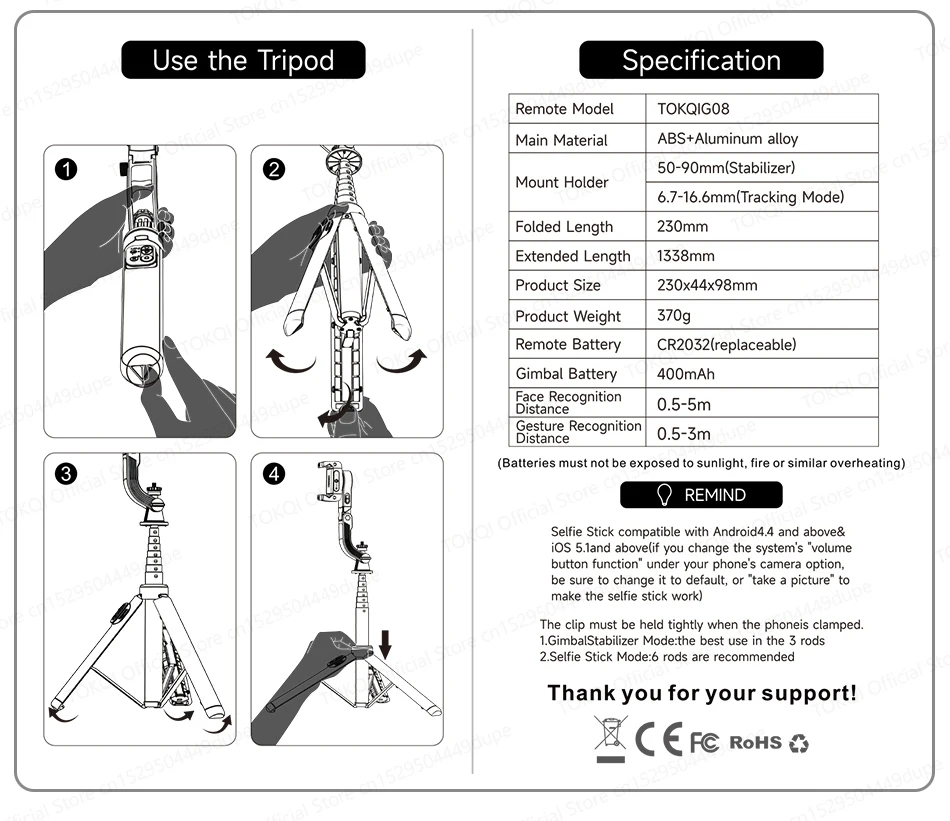
- Size: 230x44x98mm
- Support Remote Control: Yes
- Vertical Shooting: Yes
- App Setting: Yes
- Camera Integration: No
- Charging for Mobile Device: No
- Supported Mobile Device Max Size: phone width: 50-90mm; thickness: 7-14mm
- Feature: Following the shooting mode,Face Recognition
- Material: ABS+Aluminum Alloy
- Package: Yes
- Panning Angle: /
- Rolling Angle: /
- Titling Angle: /
- Configured for: Smartphones
- of Axes: 1-Axis
- Communication: Bluetooth
- Type: handheld gimbal
- Brand Name: TOKQI
- Origin: Mainland China
- Configured For: Smartphones,mirrorless cameras,action photo cameras
- Certification: CE,FCC,RoHS
- Weight (g): 370
- Color: Black
- Desktop Gimbal Supported Phone Thickness: 6.7-16.6mm
- Compatibility: Android8.0+/i0S13.4+
- Maximum Expansion Length: 1338mm
- Folded Length: 230mm
C22 Gimbal
Material: ABS+Aluminum Alloy
Communication: Bluetooth
Supported Mobile Device Max Size: Smartphone width: 50-90mm; thickness: 7-14mm
Weight: 370g
Remote Control Battery: CR2032 (Replaceable)
Compatibility: Android 8.0+/iOS 13.4+
C22 AI Tracking Gimbal Desktop Tripod
1. Independent lens, Ai intelligent tracking.
2. Intelligent anti-shake core, walking and running to take pictures.
3.3 in 1, not only stabilizer, but also tracking gimbal and selfie stick.
4. Detachable multi-function remote control, with APP, more template shooting.
5.Stable tripod.
6.High-end stable aluminum alloy rod.

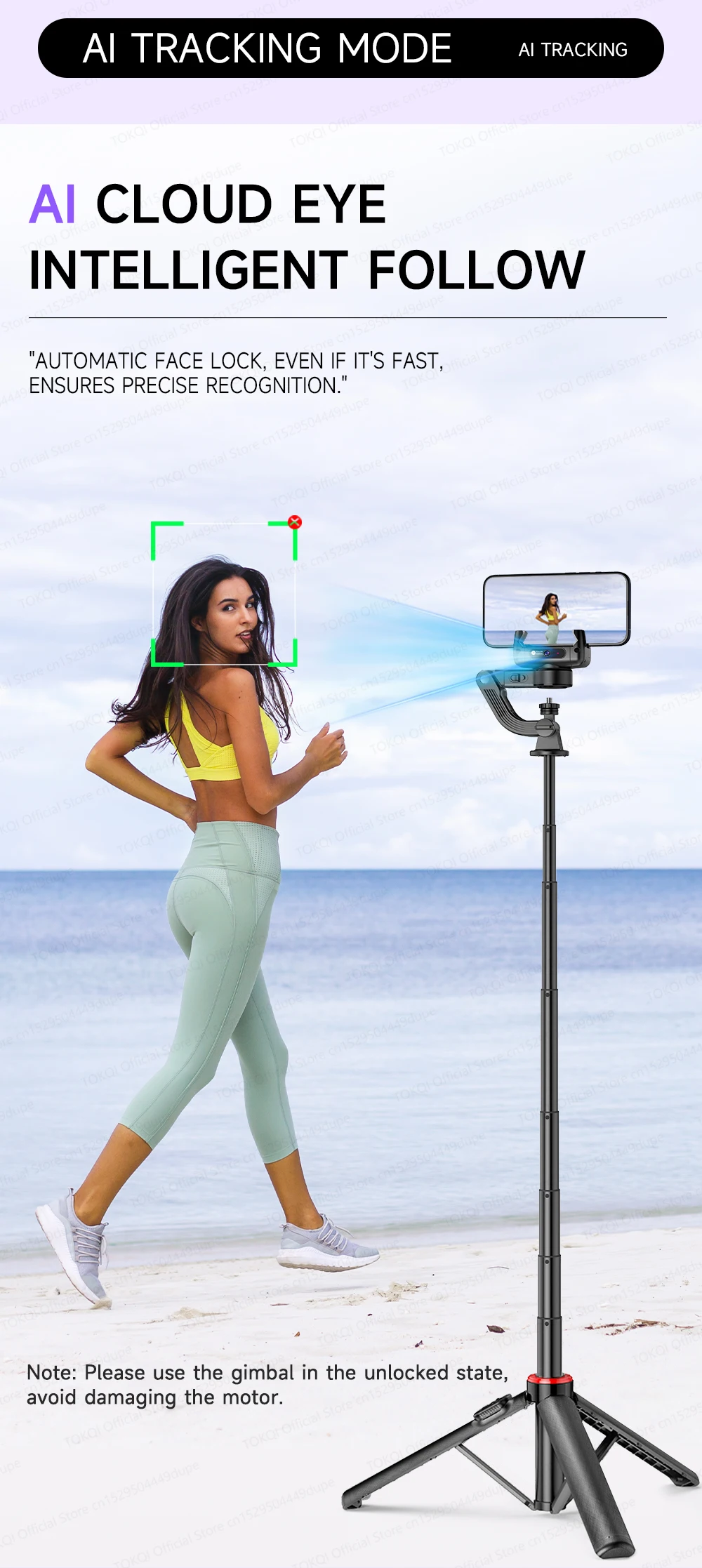
AI Tracking Mode
Note: Please use the gimbal in the unlocked state, avoid damaging the motor.
Desktop Followers
Suitable for live broadcast, online education
and conference recording
Handheld Tracking
Ideal for travel photography and vlogging Recording.


The AI Camera Is Locked In The "C” Position
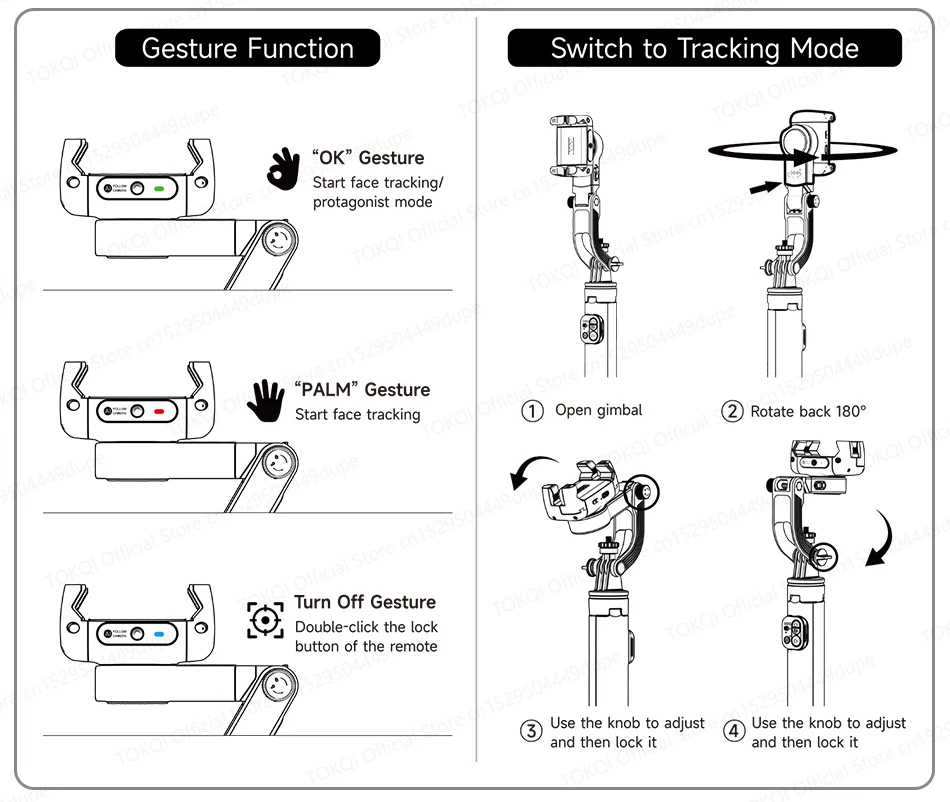
Gesture control tracking on/off.
-“OK” Protagoniset Mode:
You, always in “c” position.
-Lock You In Even If You’re Covered
A shory cover-up won’t stop tracking.
-360° Surround Shot
Seconds of panoramic blockbuster.
-Eleavtion Shot
Shooting for creative perspective


Stabilizer Mode
No matter how you shoot, It stays stable!


Intelligent Movement gyroscope
Intelligent anti-shake function for follow-up shooting, easy to shoot.
-360° Spin Shot
-Sport Steady Shot
-Low Angle Shot
-Travel Vlog


Selfie Stick Mode
Stabilized tripods for professional and stable shooting.


1.338m/52.68in Perfect Length
Quick switch to selfie stick.
Rear shotsare clearer.


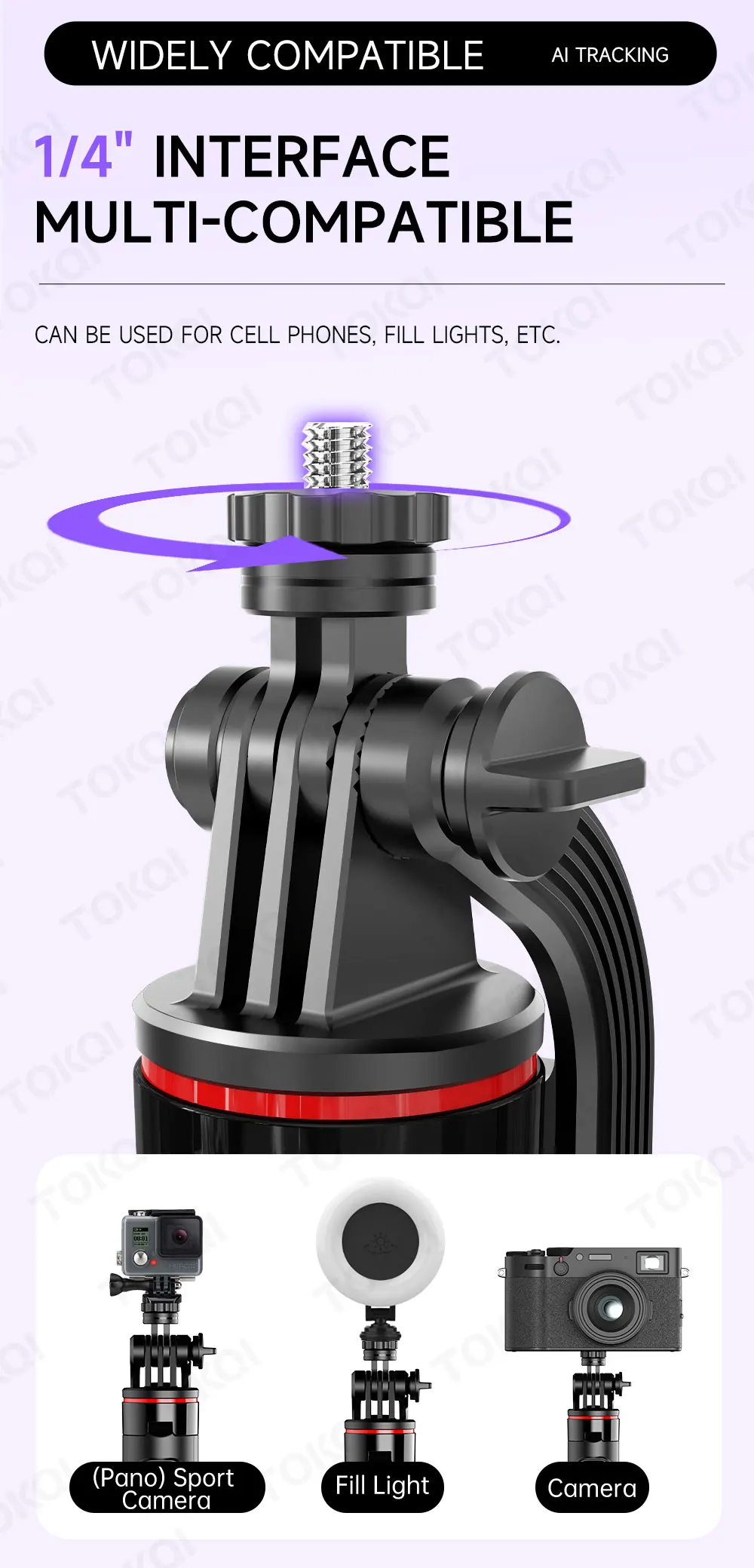
Widely Compatible
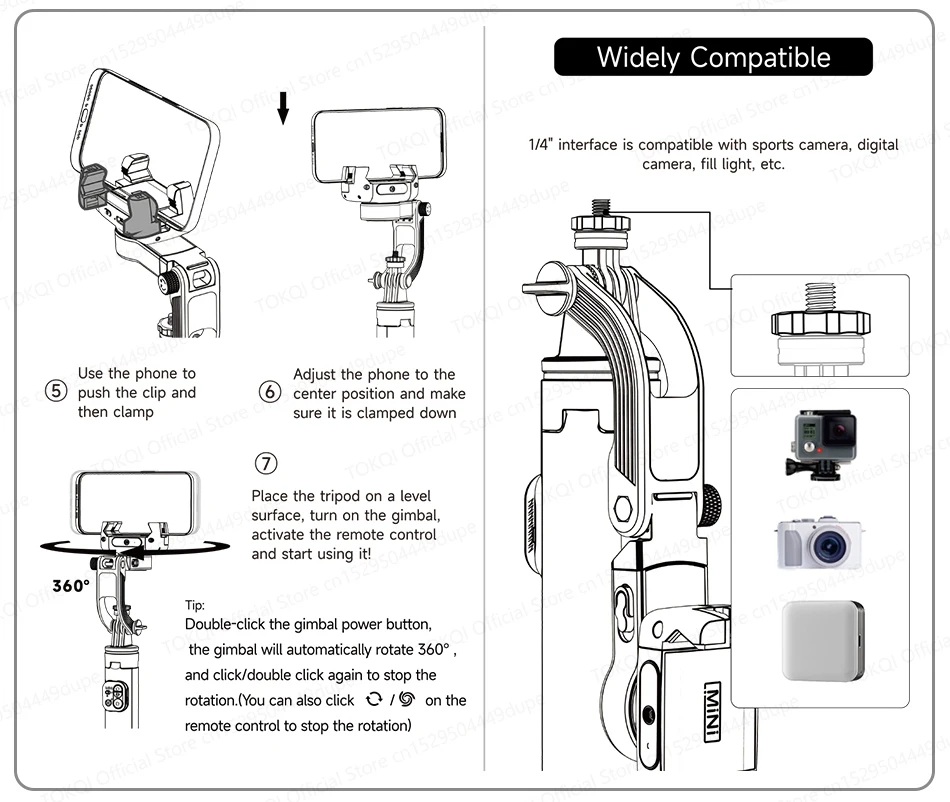
1/4" Interface Multi-compatible
Can be used for cell phones, fill-in lights, etc.
Optional DO7 Ring Light
3 color and 3 brightness for each color.

Remote Control
Embedded Design
1.Shooting
2.Stabilizer mode
-Spinshot
-Pov mode
-Horizontal and vertical
3.AI Tracking Mode
-Rotation
-Gesture Function


Pocket-sized And Portable

With APP (Gimbal Show)
-Face Filter
-Smart Tracking
-Gesture Function
-PANO & CloneMe
-DYNA-ZOOM
-TIMELAPSE


Product Parameters

C22 AI Gimbal Stabilizer User Manual
1. Part Description
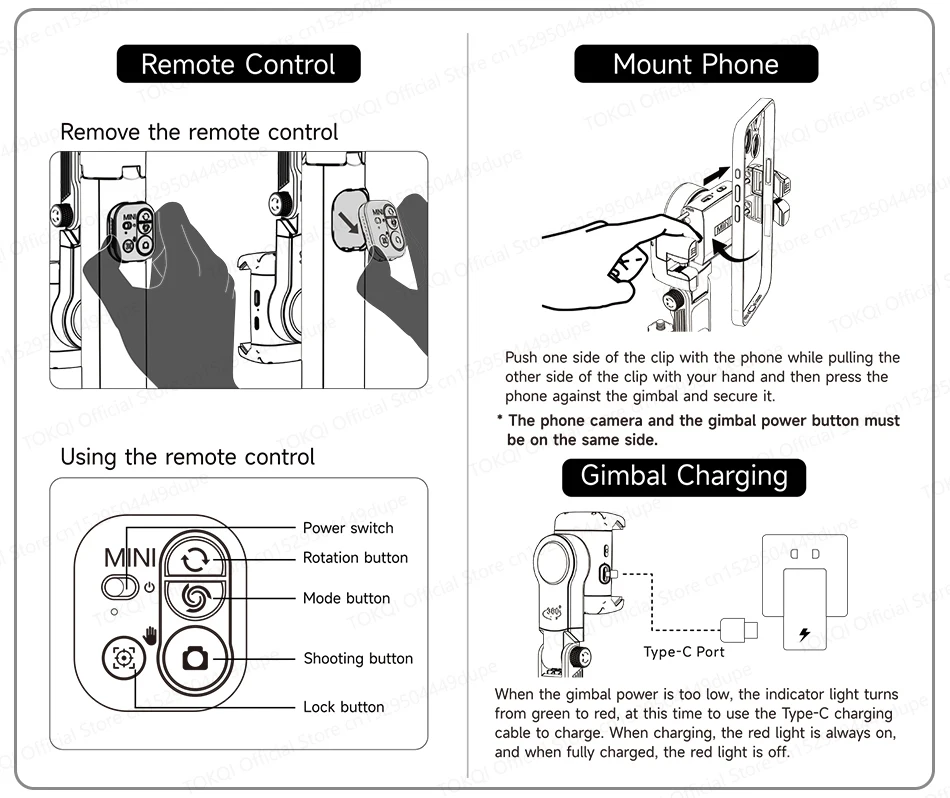
2. Remote Control
Remove the remote control.
Using the remote control.
3.Mount Phone
Push one side of the clip with the phone while pulling the other side of the clip with your hand and then press the phone against the gimbal and secure it.
* The phone camera and the gimbal power button must be on the same side.
4. Gimbal Charging
When the gimbal power is too low, the indicator light turns from green to red, at this time to use the Type-C charging cable to charge. When charging, the red light is always on, and when fully charged, the red light is off.
5. Wireless Connection
First time connection:
—Mount the phone in the center of the phone clip
—Long press the gimbal power button to turn on the gimbal, the green light flashes to enter the pairing state, search for “Gimbal Al-XXXXXX” in the phone to match, after successful pairing, the green light is always on.
*The phone camera and the gimbal power button must be on the same side.
6.Stabilizer Mode
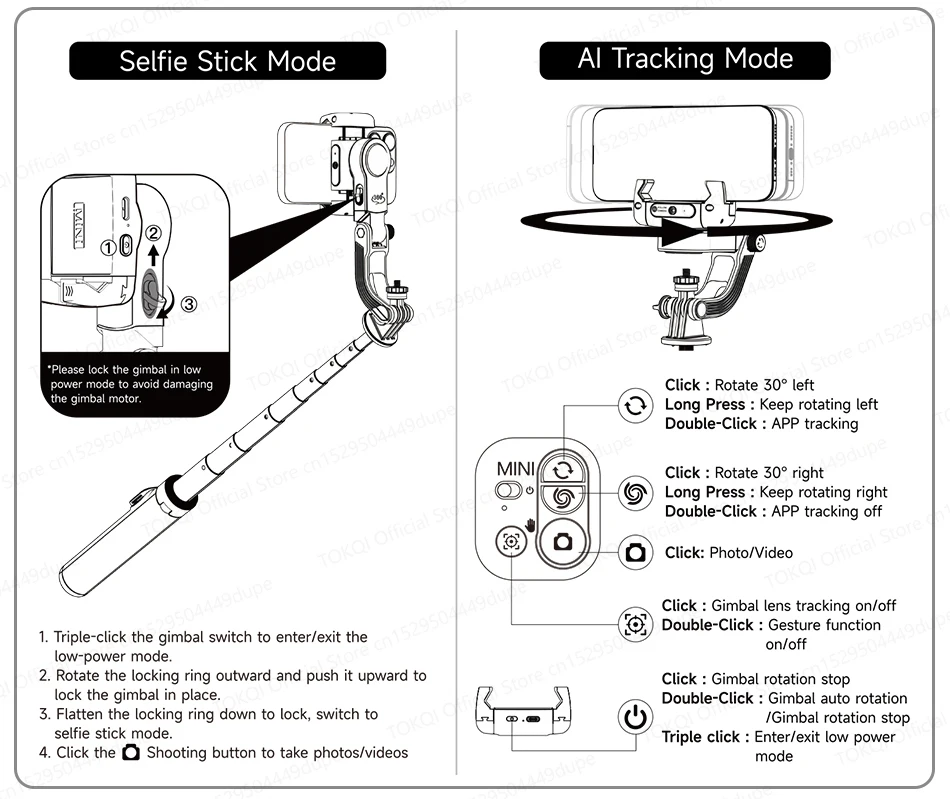
7. Selfie Stick Mode
*Please lock the gimbal in low power mode to avoid damaging the gimbal motor.
8. AI Tracking Mode
9.Gesture Function
10.Switch to Tracking Mode
11.Widely Compatible
12. Use the Tripod
13.Specification




 No products in the cart.
Reviews
There are no reviews yet.